A closure is posted
A Closed stretch, thin ice or open water on a published trail, a trail or system set to closed, or a season closing. Free.
Map guide
Your club posts a closure, a condition or a rule once, on the stretch it applies to. Every rider's route, every alert on the ride and every notification follows from that one posting. This page lists the markings a club can post and spells out exactly what each one does.
Posting markings, reviewing what riders send and keeping the map current are free for every club.
Your club posts it once
Three things carry information on the map. The club picks whichever fits what it knows.
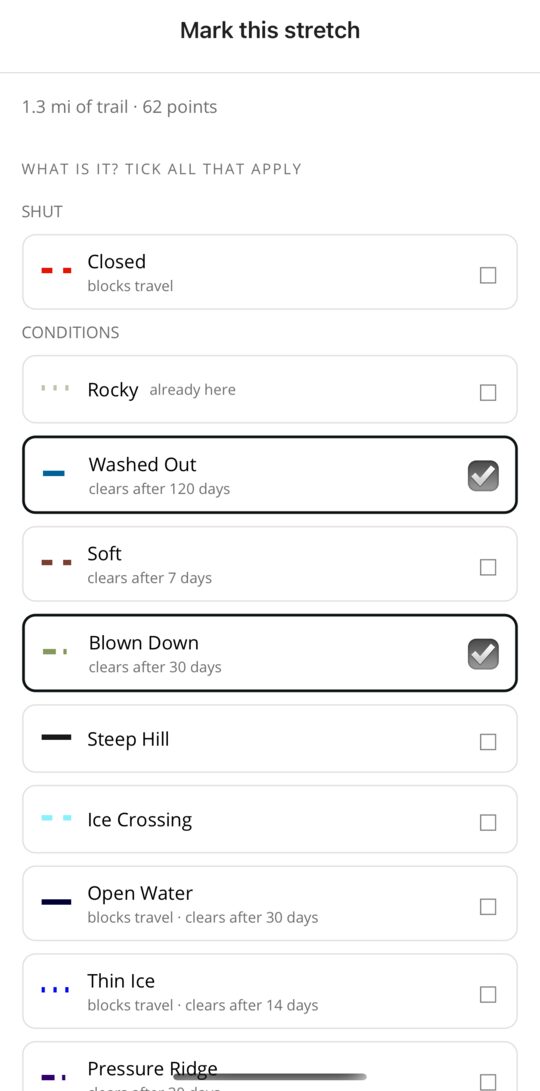
Several markings can go on one stretch from one sheet. A Trail Master or Officer posts them directly; a rider suggests them, and the club decides. Marking a stretch works with no signal and is sent when coverage returns.
Every marking is one of three kinds. A closure says you may not ride here. A condition says what riding here is like. A rule is what the club says about riding here, and it stays until the club changes it. Each kind carries a note, and conditions carry an expiry so a washout from last spring does not outlive the repair.
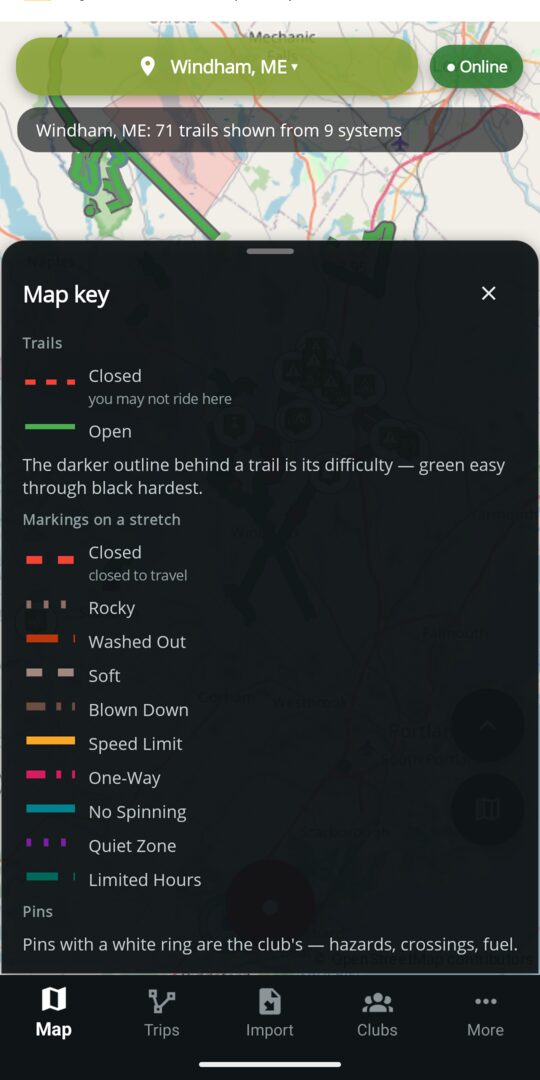
Each marking has its own colour and dash pattern, and the key only lists the ones drawn on the map in front of you. Turn on high-contrast markings and you get a second palette built for colour-blind riders; turn on marking letters and a two-letter code sits right on the stretch.
The club can add marking types of its own. The ones below ship with every club.
| Marking | Kind | What it means | Expires by default | Blocks travel |
|---|---|---|---|---|
| Closed | Closure | You may not ride this stretch. | When the club says | Yes |
| Rocky | Condition | Loose or exposed rock on the stretch. | No expiry | No |
| Washed Out | Condition | Water took the surface or a culvert. | 120 days | No |
| Soft | Condition | Mud or soft ground; expect ruts. | 7 days | No |
| Blown Down | Condition | Trees across the stretch. | 30 days | No |
| Steep Hill | Condition | A grade worth knowing about before you start up it. | No expiry | No |
| Marking | What it means | Expires by default | Blocks travel |
|---|---|---|---|
| Ice Crossing | The trail runs over ice here. That is the ground itself, not a warning. | No expiry | No |
| Open Water | The ice is gone on this stretch. | 30 days | Yes |
| Thin Ice | Ice too thin to cross. | 14 days | Yes |
| Water on Ice | Standing water over the ice. | 14 days | Yes |
| Pressure Ridge | A ridge across the crossing; cross it square and slow. | 30 days | No |
| Slush | Slush on the stretch. | 7 days | No |
| Bare Ground | The snow is gone here. | 14 days | No |
| Drifted | Drifts across the trail. | 7 days | No |
| Icy | Hard, icy surface. | 7 days | No |
| Moguls | Whoops and moguls on the stretch. | 7 days | No |
| Marking | What it means | Carries | On a route |
|---|---|---|---|
| Speed Limit | The club's limit on this stretch. | A number, in mph | Noted; never blocks |
| One-Way | Ride this stretch in one direction only. | A direction along the trail | Honoured on every route offered |
| No Spinning | No spinning tracks or tyres here, usually a landowner's lawn or a soft field. | A note | Noted; never blocks |
| Quiet Zone | Keep the noise down past the houses, during the hours shown. | Hours and days | Noted; never blocks |
| Limited Hours | Open only during the hours shown. | Hours and days | Noted; never blocks |
Rules never expire on their own. Hours and days are shown to the rider as the club wrote them; a route does not try to work out what time you will arrive.
These are rules that bar particular machines from one stretch, the way a posting bars them from a whole trail. All of them share one colour on the map and are told apart by their letters.
| Marking | Offered on | Carries | Who it bars from the stretch |
|---|---|---|---|
| No Dirt Bikes | ATV trails | A note | Dirt bikes |
| No UTVs | ATV trails | A note | UTVs |
| No ATVs | ATV trails | A note | ATVs |
| No Oversized ATVs | ATV trails | A note | Oversized ATVs |
| No Tracked ATVs | Snowmobile trails | A note | Tracked ATVs |
| No Tracked UTVs | Snowmobile trails | A note | Tracked UTVs |
| No Snow Bikes | Snowmobile trails | A note | Snow bikes |
| Width Limit | Every trail | A width, in inches | Any machine wider than the limit |
| Weight Limit | Every trail | A weight, in pounds | Any machine heavier than the limit |
| Height Limit | Every trail | A height, in feet | A machine whose rider entered a height over the limit; otherwise a warning |
A hundred yards of No ATVs does not make six miles unridable: the trail stays open, the stretch is barred, and the rider is warned on the way in.
The whole trail
A posting is the club's rule for a trail end to end, with a date window when it only applies for part of the year: Seasonal Closure, No Motorized Vehicles, Permit Required, Speed Limit, Width Limit, Weight Limit, Height Limit, and the machine bans: No UTVs, No Dirt Bikes, No ATVs, No Oversized ATVs, No Tracked ATVs, No Tracked UTVs, No Snow Bikes, No Snowshoes, No Mountain Bikes and No Dogs. E-Bike Allowed is the one posting that opens a trail rather than closing it.
A route is planned for the machine you ride. Tell the app what you are on, and every posting the club has made against that machine, every limit it fails and every closure becomes a place the planner steers you clear of, before you get there. Planning is free. Ask for a way from here to there and the planner reads every marking and posting on the trails it can see, then applies these rules, in this order.
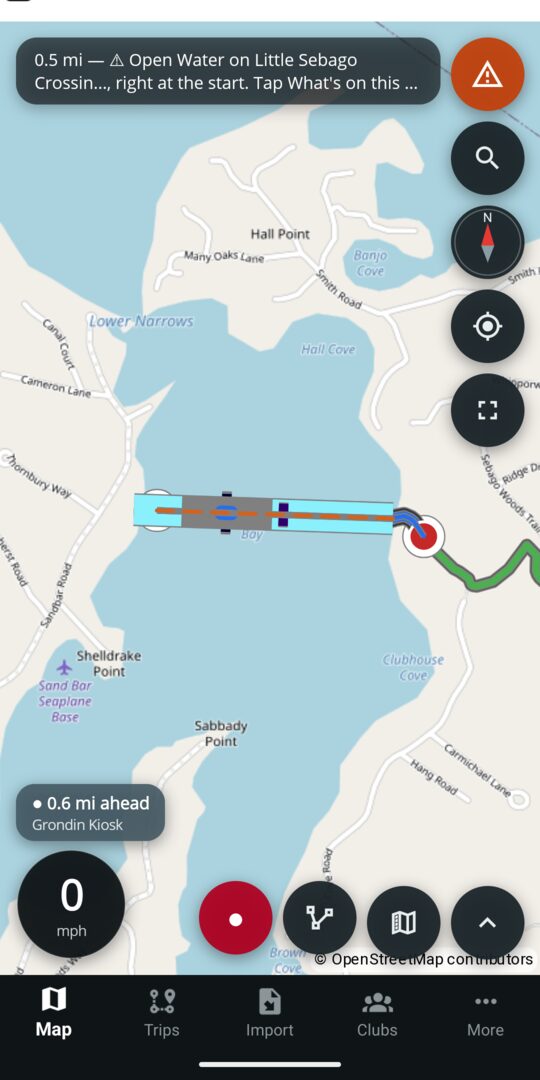
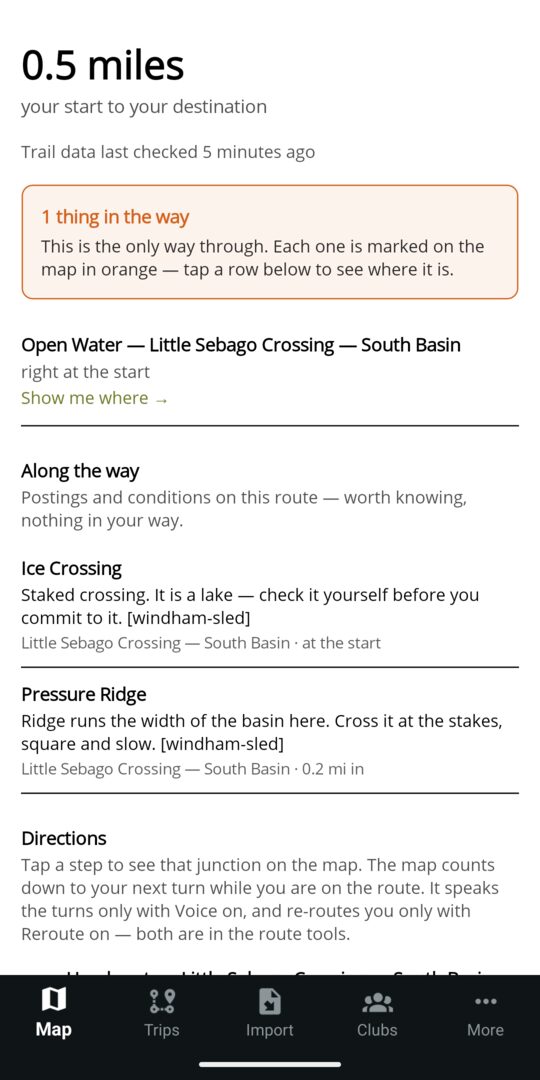
Every route comes with a list of what it crosses. Any closure it could not avoid is at the top, with a tap to see where; the postings and conditions along the way follow, each with the club's own note. Change your machine and the map changes with it. The ride sheet lists every trail in view that is closed to what you ride, grouped by the reason, and a tap opens the trail with the club's wording.
Following a route turn by turn and saving routes are Premium. Planning, reading the explanation and seeing what is barred are free, and always will be.
On the ride
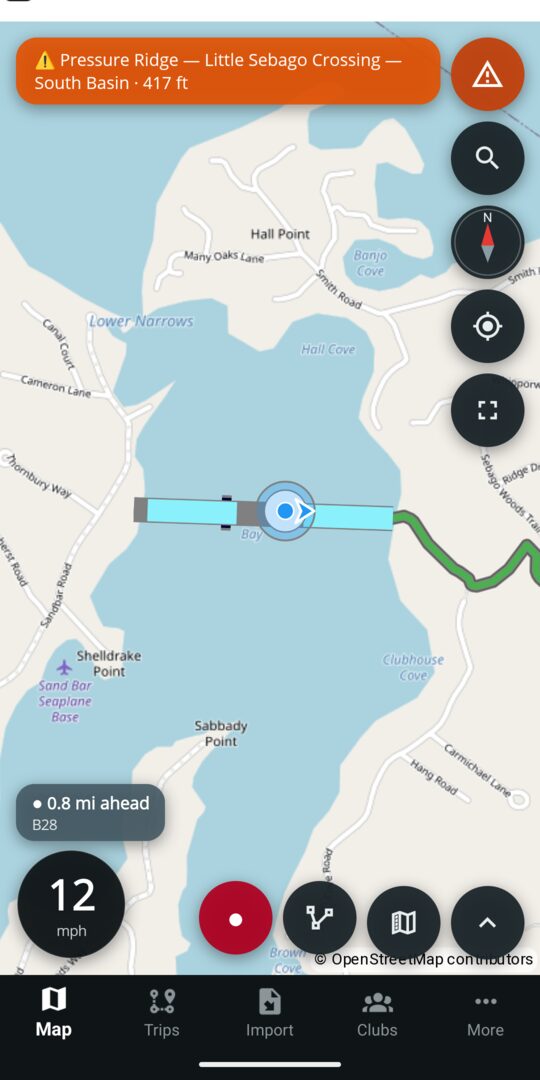
While you ride, the app watches the trail ahead for the club's markings and pins and speaks up about the ones that matter before you reach them. The same rules run on the phone, on Android Auto and on CarPlay.
Watch a trail system, or a whole state, and the club's decisions reach you as they happen, whether or not the app is open.
A Closed stretch, thin ice or open water on a published trail, a trail or system set to closed, or a season closing. Free.
The club confirms a rider's report or publishes a new pin: a bridge out, a hazard, a gas station. Free.
A new trail is approved onto the club's map, or an archive is imported. Free.
The club, the county or the state opens the season. Free.
A groomer run finishes on a trail you watch. Premium; the club's officers and trail masters get it free.
Every one of these also lands in the trail system's Recent updates, kept for ninety days, so a rider who was not watching can still read what changed.
Who vouched for it
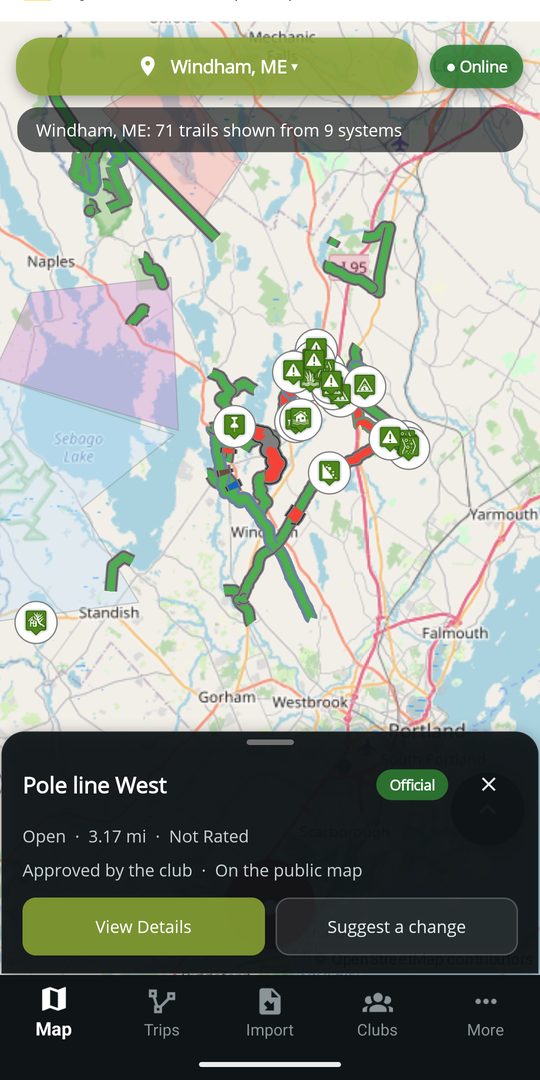
Every trail, pin and area on the map says where it stands with the club responsible for the ground. The wording is the same on the phone, on the website and in the car.
A rider's own trails and pins stay on their phone until they choose Send to the club. Nothing a rider draws reaches anybody else's map until the club, or DynamicTrail on a system no club holds yet, decides it should.
Maine and New England clubs
Bring your club's map onboard and start marking what you know. Trail files and towns can follow later.